
Choosing the right gaming PC means more than just picking the system that looks the coolest. With new technology hitting the market regularly and manufacturers using complex terminology, it can be challenging for anyone to decipher what truly matters. Learning how to read gaming PC specifications will empower you to make confident purchasing decisions and get the best value for your investment. Whether you want to compare custom builds or evaluate options like CyberPowerPC prebuilt gaming desktops, understanding key technical aspects will put you ahead of the game.
If you're shopping for your first gaming rig or looking to upgrade an older system, reading spec sheets carefully helps prevent overpaying for features you do not need or picking outdated technology that will quickly become obsolete. Let’s break down the essentials, so you can confidently assess what matters most for your favorite games and expectations.
It is also important to separate what is genuinely critical in a gaming PC spec from the extras that may only marginally impact your play. While specs like processor cores, RAM size, GPU strength, and storage are central to your gaming performance, not every spec is equally vital. For instance, a gaming PC with more RGB lighting or unnecessary peripherals may not deliver better performance than a well-balanced, less flashy system. With this knowledge, you will be able to balance performance and price in today’s competitive market.
As you become familiar with all these critical components, you will find it easier to identify where to spend and where to save as a smart shopper. With this foundation, let’s dive into the details that matter most for gaming performance.
Understanding the Core Components
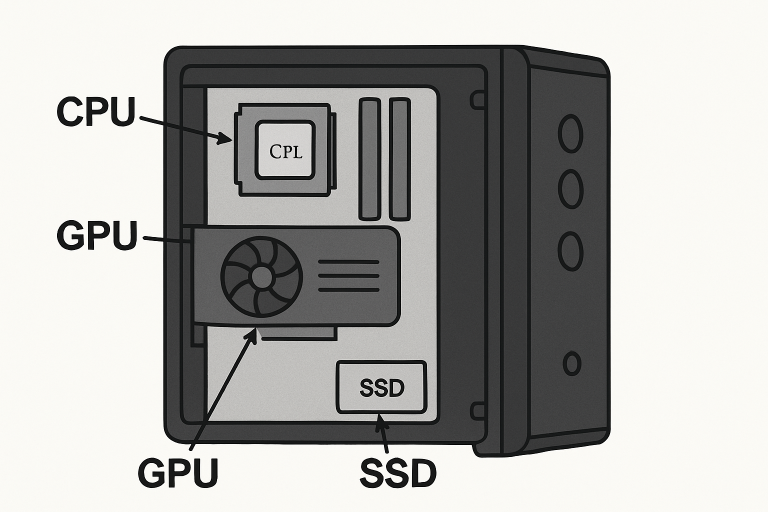
Each gaming PC relies on its core hardware to power your favorite titles and multitask efficiently. The most significant components include:
- CPU (Central Processing Unit): The brain of the PC, the CPU controls processing tasks and in-game physics. Modern games usually recommend a minimum of 6 to 8 cores, ensuring smooth frame rates and shorter load times. If you want added longevity or do creative work beyond gaming, an 8 to 12-core processor offers extra headroom for future releases.
- GPU (Graphics Processing Unit): The GPU is the single most important part of gaming, managing frame rates and rendering detailed environments. For 1080p gaming, a mid-tier card such as NVIDIA’s RTX 3060 or AMD’s RX 6600 is plenty. For 1440p, aim for higher mid-range cards; for demanding 4K games or ray tracing, only top-end cards like the RTX 4080 or above will suffice.
- RAM (Random Access Memory): RAM temporarily holds data for immediate access by the CPU. Modern games and background tasks mean you should not settle for less than 16GB. Opting for 32GB is wise for those who stream or expect to play the latest titles for years to come.
- Storage: A fast SSD (ideally NVMe) offers load times far superior to old-fashioned HDDs. A 1TB NVMe SSD strikes a balance between speed and storage, keeping your operating system and favorite games close at hand.
Evaluating Performance Metrics
The raw hardware specs are not the only numbers that matter. Digging deeper into each component’s metrics provides meaningful insight into expected real-world gaming results. Key metrics to pay attention to include:
- Clock Speed: Measured in gigahertz (GHz), this indicates how fast the CPU or GPU processes information. While higher clock speeds can mean faster performance, architecture improvements and thermal limits also play a role.
- Core Count: More CPU cores mean better multitasking and the potential for improved performance in supported games. Some modern titles leverage multiple cores to achieve greater graphical fidelity and smoother gameplay.
- VRAM (Video RAM): Dedicated graphics memory is critical for loading high-resolution textures. Higher VRAM (8GB or more) is essential for smooth gameplay at resolutions above 1080p or when using detailed in-game assets.
Connectivity and Expansion Options
No gaming PC stands alone. Your choice of ports and expansion slots can have a significant impact on your system’s flexibility and lifespan:
- USB Ports: Keyboards, mice, headsets, and storage devices rely on USB connections. Consider how many devices you’ll plug in at once and look for systems with USB-C for the latest peripherals.
- Video Outputs: Match the available ports (HDMI, DisplayPort) to your monitor. Higher-end cards typically offer more display outputs, allowing for multi-monitor setups.
- Networking: Wired Ethernet remains the gold standard for low latency in competitive gaming, but robust Wi-Fi 6 can provide a flexible setup if you are far from your router.
Cooling Solutions
Powerful gaming PCs generate heat, and high temperatures can shorten lifespan and degrade performance. Effective cooling keeps components running optimally:
- Air Cooling: This tried-and-true method uses fans and heat sinks to push warm air out of your system. For most gamers, well-placed fans coupled with a good case offer a cost-effective, low-maintenance solution.
- Liquid Cooling: Often reserved for enthusiasts or overclockers, liquid cooling enables lower noise and significantly better thermal performance. It is especially useful if you intend to run demanding games or other tasks that consistently push your hardware.
Power Supply Unit (PSU)
The PSU is the foundation of system stability and safety. Choosing a trusted, efficient PSU from reputable brands prevents failed boots and hardware damage. Always check that the wattage is sufficient for your entire system, especially if you plan future upgrades. Look for models with an 80 Plus certification for energy efficiency and reliability.
Future-Proofing Your System
Technology evolves quickly, but smart decisions can extend your gaming PC's useful lifespan. Invest in systems with:
- Upgradeability: Select a platform that makes it easy to swap out RAM, SSDs, or even your GPU in a few years, keeping your machine capable without requiring a total rebuild.
- Compatibility: Make sure your motherboard supports future CPU and graphics card releases. Researching your motherboard’s chipset and socket compatibility helps avoid dead-end upgrades.
Final Thoughts
Reading and comprehending gaming PC specifications is the best way to ensure you get a system that truly fits your gaming ambitions and budget. By focusing on foundational hardware, key performance metrics, and future-proofing, you can avoid costly mistakes and future regrets. As the world of gaming technology grows even more sophisticated, staying informed and prioritizing what matters most will help you achieve a seamless, immersive gaming experience every time you power on your PC.
Key Takeaways
- Focus on core components such as the CPU, GPU, RAM, and storage when evaluating gaming PC performance.
- Consider performance metrics such as clock speed, core count, and VRAM to understand real-world gaming performance.
- Connectivity options, including USB ports, video outputs, and networking, along with cooling solutions, are critical for flexibility and system longevity.
- Choose a reliable, properly rated PSU to protect components and allow for future upgrades.
- Prioritize upgradeability and motherboard compatibility to future-proof your system and extend its useful lifespan.
- Avoid spending extra on non-essential features such as excessive RGB or peripherals; balance performance with budget.
Most read in News
Trending articles on News
Top articles on Minutehack


 Share article via email
How To Read Gaming PC Specifications Like A Pro
Thanks for signing up to Minutehack alerts.
Brilliant editorials heading your way soon.
Okay, Thanks!